
PETLIBRO fountain filters by model
As an Amazon Associate we earn from qualifying purchases. How this works.
All four Dockstream fountains (Dockstream, Dockstream 2 cordless, Dockstream 2 plug-in and Dockstream RFID) take the same PETLIBRO filter, part PL-FF005. The Stainless Steel Fountain uses a different one, PL-FF003. PETLIBRO states a change interval of about two weeks.
On this page
Find the filter and pump for your PETLIBRO fountain
| Fountain | Filter | Pump | Checked |
|---|---|---|---|
PETLIBRO Dockstream 2 Smart Cordless Fountain PLWF116 |
|
— | |
PETLIBRO Dockstream 2 Smart Fountain (plug-in) PLWF106 |
|
— | |
PETLIBRO Dockstream Cordless Fountain PLWF115 |
|
— | |
PETLIBRO Dockstream RFID Smart Fountain PLWF305 |
|
— | |
PETLIBRO Stainless Steel Fountain PLWF006 |
|
|
Try the brand name, the model code printed on the base, or the filter code from the old packaging. Still stuck? Read when to change the filter or contact us.
Which PETLIBRO filter fits which fountain?
PETLIBRO's fountain line in our database has two filters, and the split follows the design: the Dockstream fountains (rotor-driven, wireless) share one, and the stainless steel model with a separate pump has its own.
| Fountain | Filter | Part code | Media listed |
|---|---|---|---|
| Dockstream 2 Smart Cordless | Dockstream Replacement Filter | PL-FF005 | Activated carbon, ion-exchange resin, non-woven fabric, foam |
| Dockstream 2 Smart (plug-in) | Dockstream Replacement Filter | PL-FF005 | Same |
| Dockstream RFID Smart | Dockstream Replacement Filter | PL-FF005 | Same |
| Dockstream Cordless | Dockstream Replacement Filter | PL-FF005 | Same |
| Stainless Steel Fountain | Stainless Steel Fountain Replacement Filter | PL-FF003 | Activated carbon, foam |
The Dockstream pack pairs filters with pre-filter sponges. PETLIBRO lists the same part for the original Dockstream and for Dockstream 2, so a household that owns both can stock one type. The finder above lists each row with its source and check date.
How often should I replace it?
PETLIBRO states about two weeks, and says to change more often with several pets. That is shorter than Catit's 30 days; the interval page puts the brands side by side. A faster cycle is not automatically better or worse, since the filters differ in size and media, so follow the maker for your model.
How do I install a new Dockstream filter?
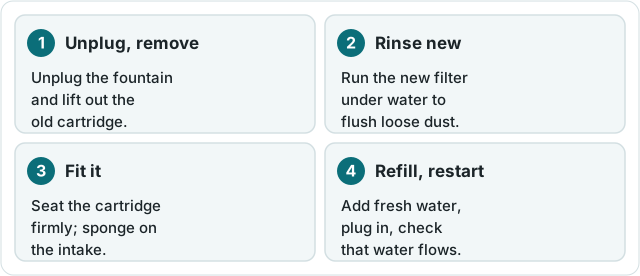
- Switch off or unplug the fountain, and lift out the old filter and its sponge.
- Soak the new filter in water for about 5 minutes and rinse it, as PETLIBRO advises.
- Fit the filter and the pre-filter sponge into the filter tray. The database has no direction note for this part, so copy the orientation shown in the manual.
- Refill the tank, restore power and check the water flows evenly.
This is also the moment to clean the tray and rotor shaft. A dirty rotor shaft is a documented cause of noise and of the fountain not running on the Dockstream 2, and a clogged filter is a documented cause of weak flow. Both are covered in fixes.
What if my model is not here?
PETLIBRO makes other fountains that are not yet in our database. Check the manual or the PETLIBRO brand page for official support links, or return to the filter finder and search by model.
FAQ
Which filter fits the PETLIBRO Dockstream 2?
The Dockstream Replacement Filter, part code PL-FF005. PETLIBRO lists it for the Dockstream and Dockstream 2 models; it is also what our database records for the Dockstream RFID.
Does the stainless steel PETLIBRO fountain use the same filter?
No. The Stainless Steel Fountain is listed with PL-FF003, a carbon and foam filter. It also has its own replacement pump, PL-FF013-01W.
How often should I change a PETLIBRO filter?
PETLIBRO states about every two weeks and advises changing more often if you have several pets.
Do I need to prepare the new filter?
For the Dockstream filter, PETLIBRO says to soak it in water for about 5 minutes and rinse it before first use. Each pack also includes pre-filter sponges.